Project: Video Barcoder
Why a Video Barcoder?
In 2019, I was learning how images actually work, not through high-level libraries, but by generating them one pixel at a time in C++.
After building a few topographic maps from CSV files, I wanted something more ambitious. Something that felt computationally heavy. Something visual.
The idea I landed on:
Take a video file and compress it into a single image.
Not by resizing it. Not by sampling frames randomly.
But by processing every frame and distilling it into a visual timeline. Essentially, a barcode made of color.
The Idea
At a high level, the plan was straightforward:
- Prep work – Split a video into its individual frames and store each frame as an image.
- Process – Iterate over every pixel in every frame and compute statistical reductions (max, median, average RGBA).
- Output – Construct a new image from those computed values.
Each frame would become a vertical slice of the final image.
Stack enough of those slices together, and you get something surprisingly compelling: a compressed visual fingerprint of an entire video.
The First Problem
It worked.
That was the good news.
The less-good news: even a 15-second, 60fps video, about 900 frames, took nearly 30 minutes to process.
The bottlenecks were everywhere:
- Writing frames to disk
- Reading frames back from disk
- Nested loops over every pixel
- Repeated memory allocations
I had definitely achieved the “challenge” part.
But I also knew this couldn’t scale.
The output was cool, but the time to generate the image was not.
Enter OpenCV
When I revisited this project, I was using Python professionally.
Gone were the days of proving I could out-stubborn a compiler with raw C++ and caffeine. Now the goal was different: write something clean, efficient, and maintainable.
Python’s native libraries don’t provide low-level video decoding capabilities out of the box, and I had no intention of rebuilding video codecs from scratch.
So I reached for OpenCV.
OpenCV immediately gave me:
- Video decoding without manual frame exports
- Frames as NumPy arrays
- Access to highly optimized C/C++ operations under the hood
Instead of dumping thousands of images to disk and iterating pixel-by-pixel, I could:
- Stream frames directly from the video file
- Process them in memory
- Use vectorized NumPy operations
- Avoid explicit nested loops entirely
Rethinking the Architecture
The original C++ approach looked something like this:
for each frame:
    for each pixel:
        accumulate RGBA values
It was explicit. It was educational. It was slow.
The Python/OpenCV version became:
- Read a frame from
cv2.VideoCapture - Treat it as a NumPy array
- Collapse one axis using vectorized operations (mean, median, max)
- Append the resulting column to the barcode image
Instead of iterating pixel-by-pixel in Python (which is slow), I let NumPy operate over entire arrays at once (which is fast).
No disk round-trips. No inner loops. No unnecessary memory churn.
From Frames to Barcode
Conceptually, the barcode works like this:
- Each frame becomes a vertical line
- That line represents a statistical reduction of the frame
- All lines placed side-by-side form the final image
Depending on the reduction function, you get different visual signatures:
- Average barcode → smooth, blended transitions
- Median barcode → resistant to outliers and sudden flashes
- Max barcode → preserves highlights and brightness spikes
The output becomes a compressed timeline of color and intensity.
A 2-hour movie becomes a few thousand pixels wide.
It’s compression in a very literal sense.
Performance Comparison
The performance difference was dramatic.
| Version | 15s @ 60fps | Approx. Processing Time |
|---|---|---|
| C++ (manual pixel iteration + disk frames) | ~900 frames | ~30 minutes |
| Python + OpenCV + NumPy | ~900 frames | Seconds |
The key insight wasn’t:
“Python is faster than C++.”
It was:
Architecture matters more than language.
The original implementation suffered from:
- Excessive disk I/O
- Deeply nested loops
- Lack of vectorization
Once those were removed, the problem became computationally lightweight.
What the Barcodes Reveal
What I love most about video barcodes is what they expose.
- Fast-cut action scenes produce abrupt visual discontinuities.
- Slow cinematic pans create smooth gradients.
- Dominant color palettes take over entire stretches of the image.
- Scene transitions become immediately visible.
You can often identify pacing and tone without ever watching the video.
It's like looking at the DNA of a film.
Gallery
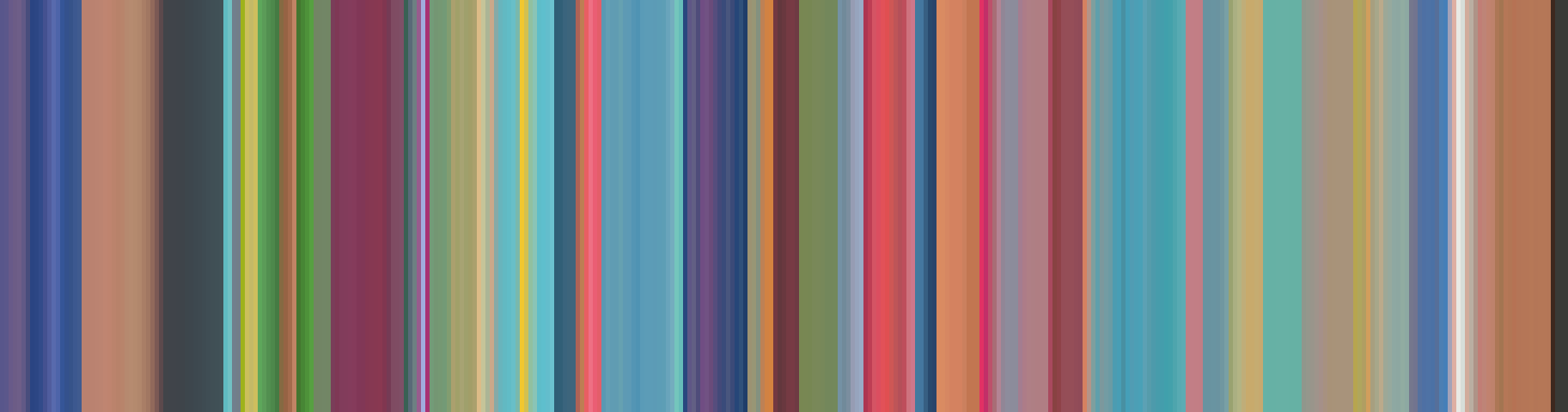
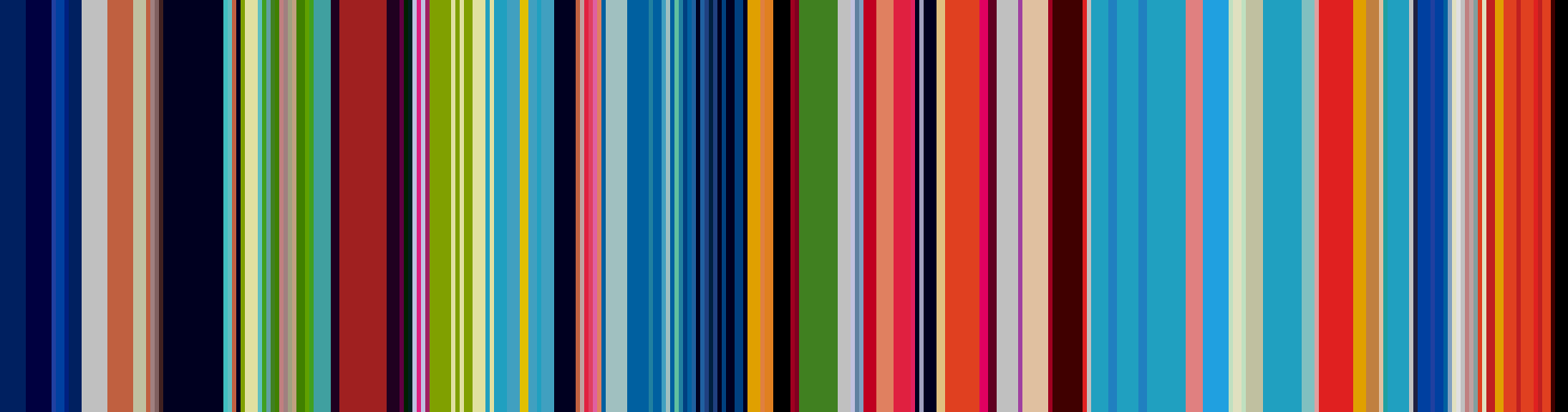
Here are some real outputs from the barcoder. Each pair shows the same video intro processed with two different reduction functions — average and dominant color.
Pokemon Intro
The Pokemon intro is packed with bright, rapidly shifting colors. The average barcode blends them into soft pastels, while the dominant barcode preserves the bold primaries — you can practically see each scene cut.
Samurai Champloo Intro
Samurai Champloo has a much more restrained palette — muted earth tones, deep shadows, and bursts of orange. The average barcode reads like a warm, dusty gradient. The dominant barcode sharpens the contrast between the dark and bright scenes.


What I Learned
This project taught me more than I expected:
- I/O is often the real bottleneck
- Vectorized operations are transformative
- Most performance problems are architectural
- You don’t need to reinvent battle-tested tools
It also reflects a shift in mindset.
Student mindset:
“I’ll build everything from scratch to prove I can.”
Professional mindset:
“What reliable tools already solve 80% of this problem?”
What I’d Improve Next
If I were to extend this project further, I’d explore:
- Parallel frame processing
- GPU acceleration (CUDA with OpenCV)
- Real-time barcode generation
- Interactive exploration (hover to jump to timestamp)
- Additional statistical reductions (variance, saturation, luminance)
There’s room here to turn an experiment into a genuinely useful analysis tool.
Final Thoughts
This project sits at the intersection of:
- Computer vision
- Data visualization
- Performance engineering
- Creative experimentation
It began as a challenge: “Can I do this in C++?”
It evolved into something more valuable: A lesson in architectural thinking and choosing the right tools for the job.
And the result, a video reduced to a strip of color, is still something I find visually compelling.